


There were a lot of articles about the problem that Sitecore removed Package Designer and Installation Wizard from SitecoreAI and disabled them in Sitecore 10.5 by default. I have read a few of them. Most of them are similar wrappers on top of the Content Transfer API and differ only in UI/UX taste and attention to detail. I will try to look at this challenge from a different angle and suggest an alternative approach. So, do not rush to close this article.
How did we use Sitecore Package Designer and Installation Wizard?
Sitecore has always had different approaches to transferring content. Database backups, Sitecore Package Designer and Installation Wizard, item serialization, TDS, Razl, Update packages, Unicorn serialization, Sitecore Courier, SPE, Sitecore CLI serialization, Content Transfer API. Over time, some methods become more popular, and others become less popular. It evolves: a new method appears, and the old method becomes unpopular. How come that disabling Sitecore Package Designer caused so much attention? As it is just one of the dozen approaches, it should be taken more easily. But it was not.
Sitecore Packages (from here and afterward I will use Sitecore Packages as a synonym for Sitecore Package Designer and Installation Wizard) were a universal language to transfer Sitecore items over the many years. You were able to create a package in Sitecore 6.5 and install it on SitecoreAI or vice versa. You didn’t have to configure anything in any environment. You get it out of the box. You can get the file with all required data. Install it on the local instance to reproduce the issue. Promote it to production to make a hotfix. Hand it to a colleague to share the work. Do what you want and how you want. Other methods were and are better for an established Sitecore software development lifecycle. But nothing was able to compete with Package Designer and Installation Wizard for quick operations. All other methods required at least some configuration to connect to the instances.
Another usage on how devs and content authors used packages was for backups. If you are unsure about your changes, want to experiment, you are a newbie in Sitecore, you want to try something new, or you are very hesitant, then there was no easier backup way than to create a package. There were different ways. But a package with a checkpoint, which you can easily revert to, was the easiest solution!
Sitecore Packages were also used to transfer files. It was an important feature pre-SitecoreAI era. But we stopped using it in the SitecoreAI era due to the architecture shift.
There was also a possibility to transfer a security account (users and roles) using Sitecore Packages. But those were rare cases.
Packages could also run post-installation steps: custom code executed right after the package was installed. It was only used by Sitecore in their hotfixes and for very rare cases in CI/CD implementations. We can ignore it as well.
So, summing up, Sitecore Packages were used as a Swiss knife for transferring items (and files in the pre-SitecoreAI era).
Is the Sitecore Content Transfer API the proper replacement for Sitecore Packages?
Sitecore had very strong reasons for removing Sitecore Packages. Otherwise, I don’t believe that they could do this step. They suggested the Sitecore Content Transfer API as an alternative. Sitecore has a strong community. And many SitecoreAI Marketplace apps have been created that utilize the Content Transfer API to transfer items from one environment to another. And partially, they solve the problem of the absence of Sitecore Packages. But many challenges remain open.
The first problem is your local development containers. It is still convenient to have Sitecore locally. SitecoreAI Marketplace can connect only to cloud SitecoreAI instances. I implemented the ability to run SitecoreAI Marketplace apps locally. But local apps can access only your local container instances. And a major part of content transfer apps requires a simultaneous connection to two instances (local and remote), which is currently impossible.
Also, the Sitecore Content Transfer API requires Azure Blob Storage configuration for your SitecoreAI local container instance to make the Content Transfer API work locally. Remember to configure it or use the Azurite emulator.
You can use the Sitecore Content Transfer API without the Sitecore Marketplace API. But then you have to manage the Client ID, Client Secret, and URL (only for local) for your instances. It is not convenient and requires additional infrastructure, as you don’t want to pass your credentials to 3rd party websites.
Also, it is inconvenient to use these apps as a backup system or to transfer data from one colleague to another.
So, no, unfortunately, Sitecore Content Transfer API is not a proper replacement.
Can we implement Sitecore Packages as SitecoreAI marketplace module?
SitecoreAI has a powerful Authoring API. We can read and write items. However, there is one huge limitation. The createItem Authoring API mutation does not allow setting up itemId. The new identifier is created on the fly. I guess that Sitecore did it this way to achieve availability in the CAP theorem. But it makes it impossible to use it for creating exactly the same items in different environments. Different identifiers mean different items, as Sitecore items are linked by itemId.
That is why it will be possible to implement Sitecore Package Designer using the Sitecore Authoring API. But it will be impossible to implement the Sitecore Installation Wizard only with the Sitecore Authoring API. We also need to use the Content Transfer API.
Files and security accounts could not be implemented using the existing SitecoreAI API. But we don’t want to. It will be wrong from an architecture point of view. That is not the proper way of managing files and security for a SaaS service.
Packages Formats
I like to stick with the classic ZIP file packages. It is a well-known format. It is an archive that contains the XML item definitions, BLOB media items, and text files with metadata. You can open the file and check the details there without a need to install any additional software.
Sitecore Content Transfer API has its own format to use .raif. It is a protobuf binary serialization of the content. It will require conversion from .zip format to .raif to use the Content Transfer API.
This decision adds extra complexity in the implementation, but it remains more human-friendly. And we have proper backward compatibility.
UI/UX
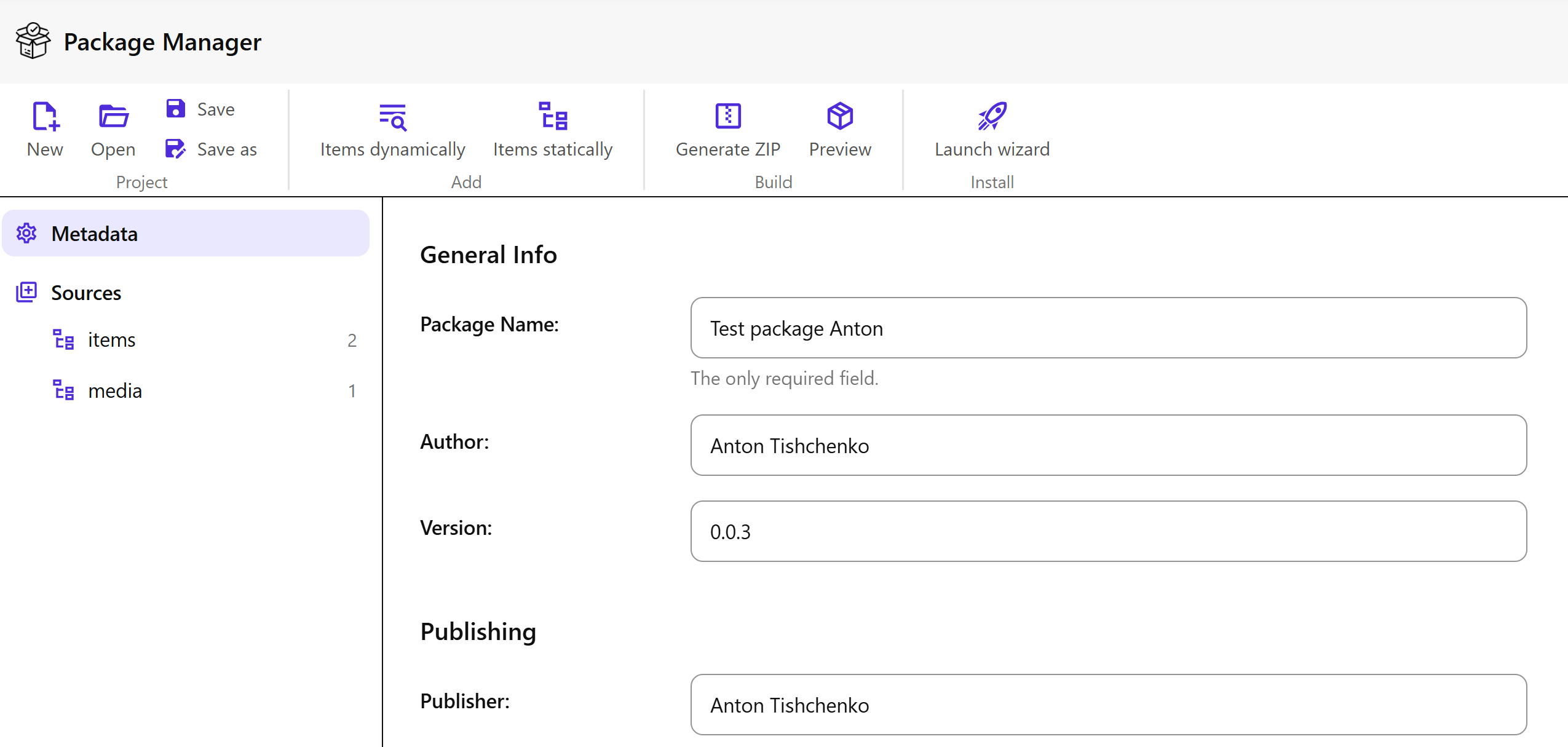
The habit is a strong power. Package Designer dialogues are burned into our neurons over the last decades. It is possible to invent something new and better. But it will take time and effort to start using it. That is why it is better to stick to the original design at least for the first version.
The Architecture
The code itself is less and less valuable in the modern world due to AI. What matters is the architecture. It allows you to understand how things work together without diving into the details.
The classic Package Designer used Sheer UI. We don’t want to and can not reuse it with SitecoreAI. We will rely on Sitecore Blok.
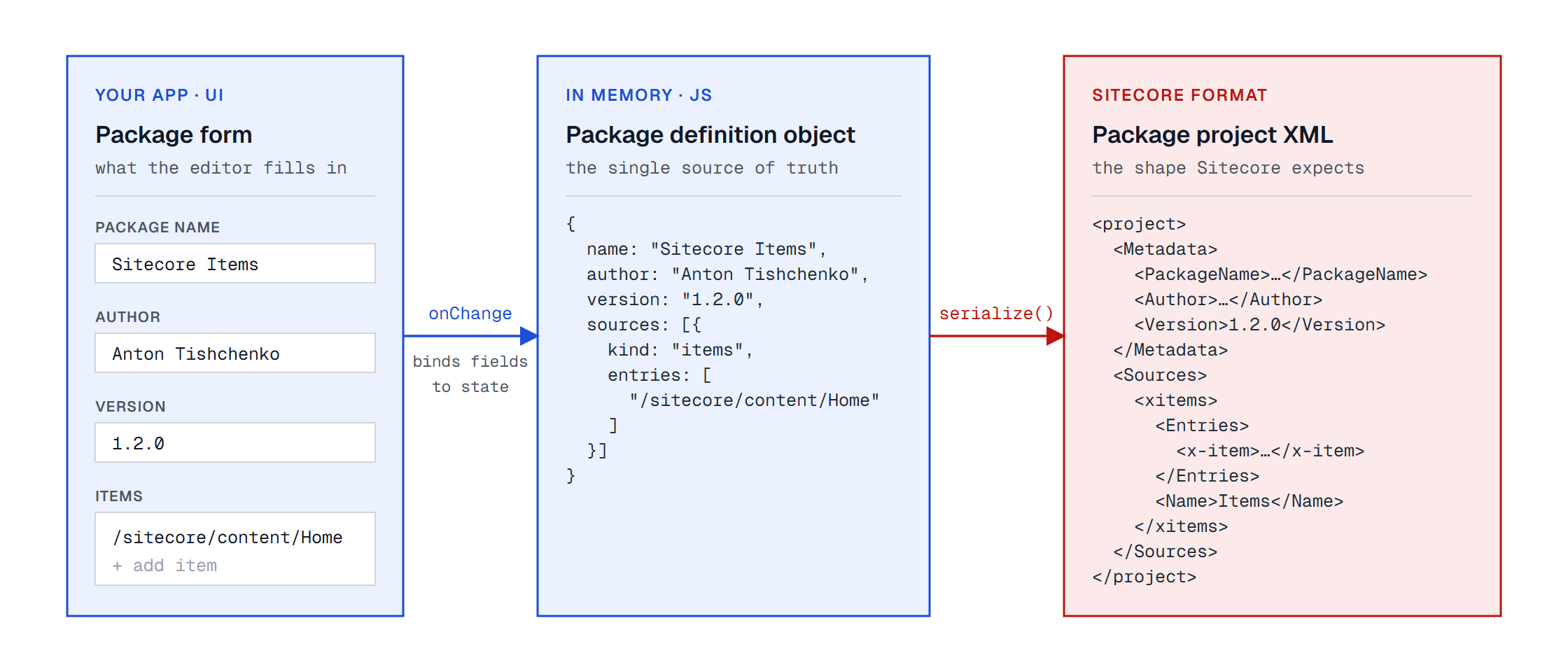
Package definitions were saved in XML format. We don’t add any new features for now (only remove files and security accounts). This means that we can keep the same format to keep things as uniform as possible.
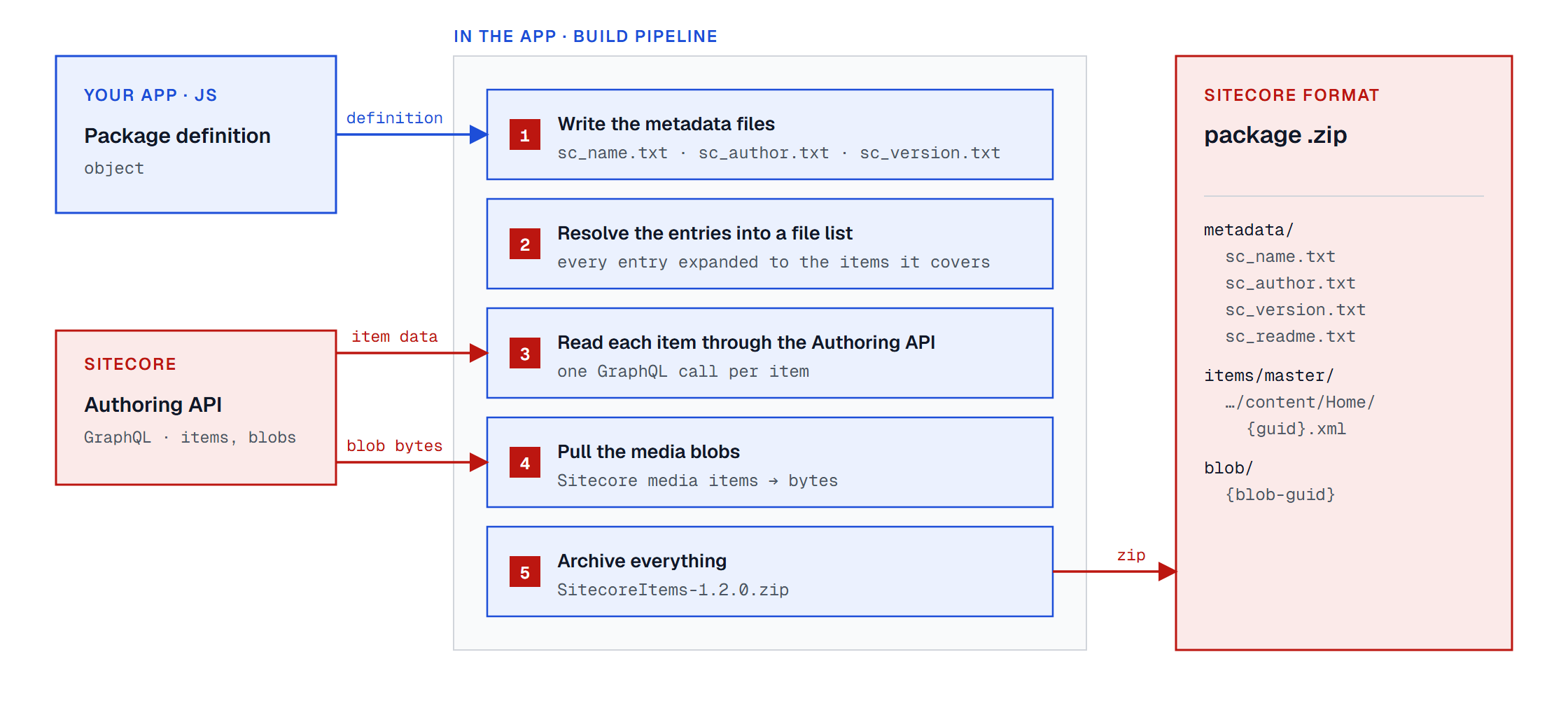
Once we have the definition, we can create text metadata files, prepare the list of files that have to be added to the package, read them using the Authoring API and convert them to XML definitions, read the media BLOBs, and archive everything into zip package.
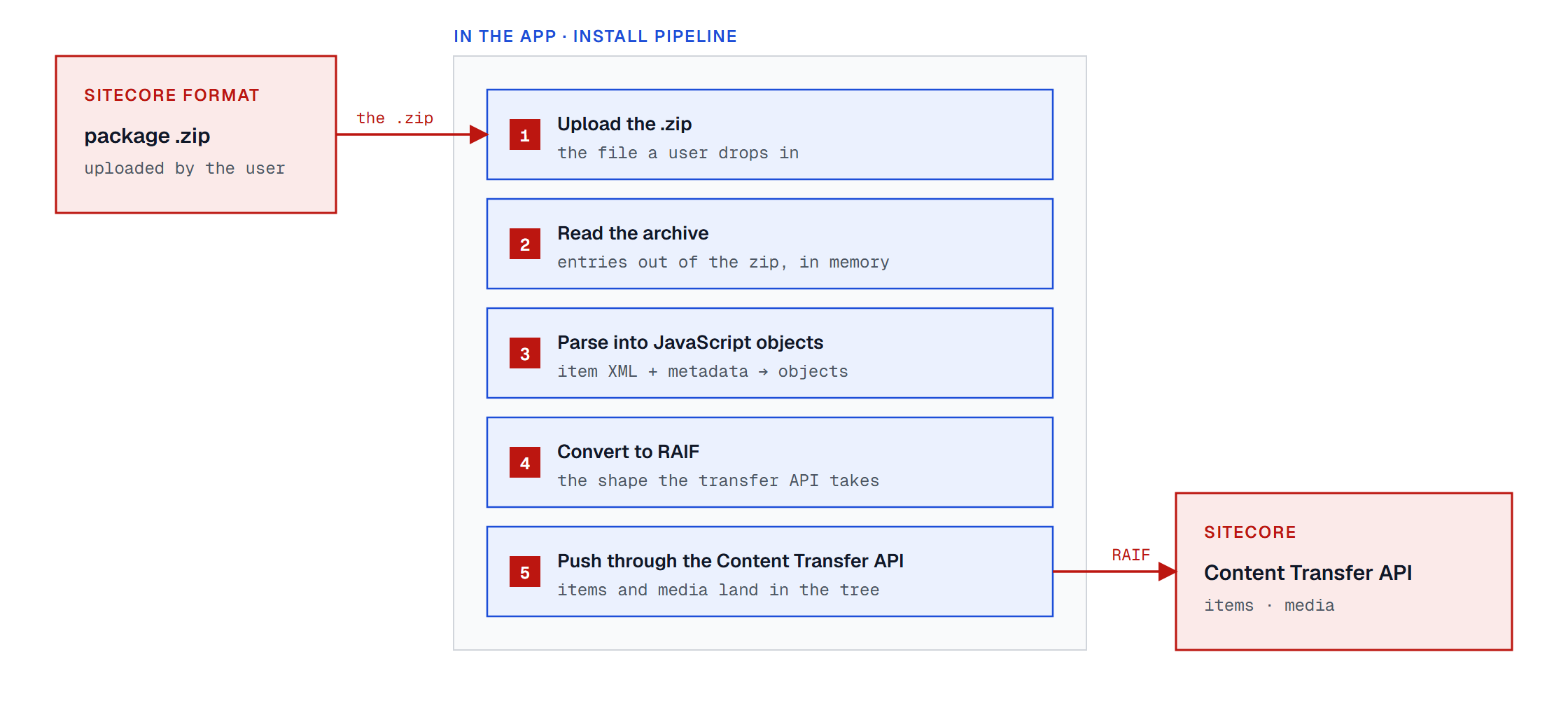
Installation of the package will require the conversion. We upload zip file, read it, parse it as JavaScript objects, convert to raif format, and push the content to Sitecore using the Content Transfer API.
Limitations
There are limitations that could not be achieved with the current API and the current application architecture. I already mentioned the absence of files, security accounts, and post-installation steps. It can be thought of as a disadvantage or as a security feature depending on your needs.
The Sitecore Content Transfer API doesn’t have the ability to implement the same flexibility with Overwrite, Merge Clear, Merge Append, Merge Merge, Skip, Ask User choices that we had before. Now we should select between OverrideExistingItem, KeepExistingItem and OverrideExistingTree. It may cause mismatched expectations or weird bugs in this area.
The marketplace application is running in the browser. It is secure. You can check the network panel that none of your data is sent to any 3rd-party hosts, even if you use an application that you don’t own. But from another side, the bigger your package is, the more memory your browser tab will consume. I don’t recommend using it for huge content transfers.
Conclusions
I have “reimplemented” the Sitecore Package Designer and Sitecore Installation Wizard as a Sitecore Marketplace application. You can create, manage, and install Sitecore packages in the way that you used for the previous decades. You can run it for your cloud SitecoreAI environments or/and configure and use your local marketplace host to run it via Sitecore local containers.
It is available as open-source code on GitHub. Or you can use the hosted version on Netlify (you have to register a new application in your Sitecore organization in order to use it).
It is an early version of this idea. And I will be glad of any feedback: bugs, ideas, testing, pull requests. You can just drop me a message. If you think that this application may be useful for your daily work, then you have a chance to improve it and tune it to better fit your needs.